December 25th 2025 Release
 Ryan Rapp
Release Notes - December 2025
Major Features
⚡ Instant Offline Launch
Your desktop app now launches in under 500ms, even without internet connectivity. Work uninterrupted with full access to your local data, while the app syncs seamlessly in the background when online. The app has transformed from online-first to local-first with cloud sync.
Key capabilities:
- Sub-second boot times using cached credentials
- Full access to tasks, messages, and calendar events offline
- Automatic background validation and sync when connected
- Smart token management with graceful degradation
🎯 AI Task Synthesis
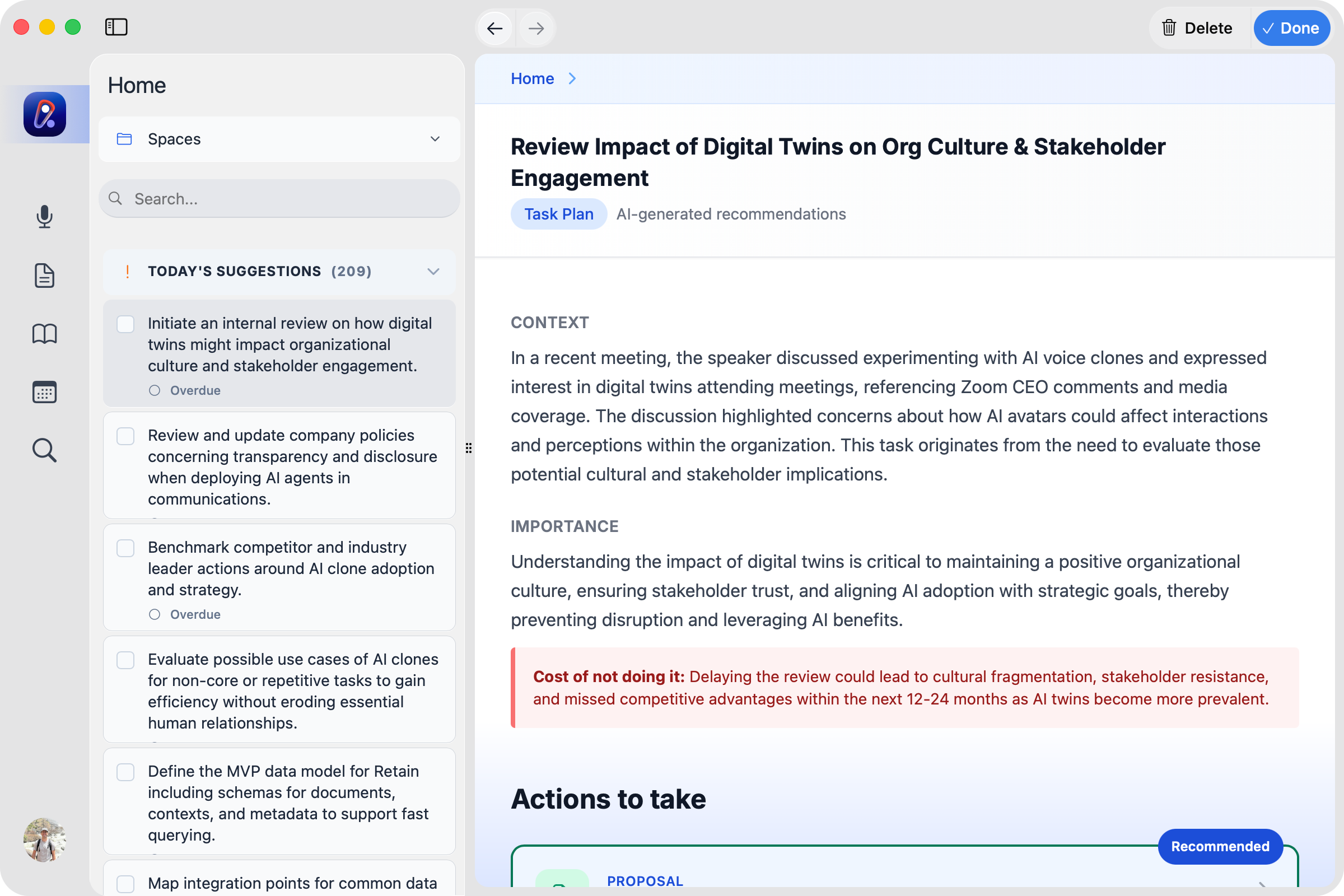
Transform your meeting notes into actionable work with our new AI-powered task system. Get curated task recommendations with full context, importance analysis, and ready-to-execute action prompts.
What's included:
- Intelligent task extraction from meeting transcripts
- Comprehensive task plans with context and impact analysis
- 4-6 suggested actions per task (emails, proposals, summaries, meetings, etc.)
- One-click execution with pre-generated prompts
- Source references from your actual discussions
✍️ Advanced Draft Input
Compose messages faster with our powerful new editor syntax that supports mixing email addresses, context references, and AI agent selections in a single flow.
Syntax features:
- @name or @email for recipients
- #document for context references
- @agent for AI personas
- Smart autocomplete with keyboard navigation
- Seamless integration with the draft wizard
🎨 User Experience
Navigation & Interface
- Unified Top Navigation: Consistent navigation experience across all app sections
- Dark Mode Polish: Comprehensive dark mode improvements throughout the app
- Task Workflow: Enhanced task display with breadcrumbs, tiles, and better action visibility
- Split Panes: Consolidated pane management for cleaner layouts
Onboarding & Help
- Interactive Tours: Guided walkthroughs for home and drafts with contextual avatars
- Enhanced Help Guide: Improved search, navigation, and mobile support
- User Documentation: Comprehensive help articles integrated into the app
🔧 Performance & Quality
Build & Infrastructure
- Cross-Platform: Improved Windows support with WASAPI transcription and CUDA builds
- Type Safety: Comprehensive TypeScript improvements across all packages
- Test Coverage: More robust test suite with better mocking and reliability
🐛 Bug Fixes & Polish
- Fixed conversation history and chat dropdown issues
- Improved file upload UX with loading states and previews
- Resolved revision checkpoint and draft conversation bugs
- Better error handling for Raptor search and model loading
- Fixed numerous dark mode inconsistencies
- Improved calendar navigation and event handling
- Better handling of mentions in editor (copy/paste, keyboard navigation)
📊 Technical Improvements
- Reduced bundle size through better code splitting
- Optimized image loading and caching
- Improved database query performance
- Better memory management for long-running sessions
- Enhanced logging and analytics
Note: This release represents significant architectural improvements focusing on offline-first capabilities, AI-powered productivity features, and overall user experience polish. The app is faster, more reliable, and more capable than ever.
Ready to boost your productivity?
Try Retain and experience the power of AI-driven productivity tools.
Start Free Trial